Your station on your own site, without having to build anything. You pick a component, set the colours, see immediately what it looks like, and get the code to paste.
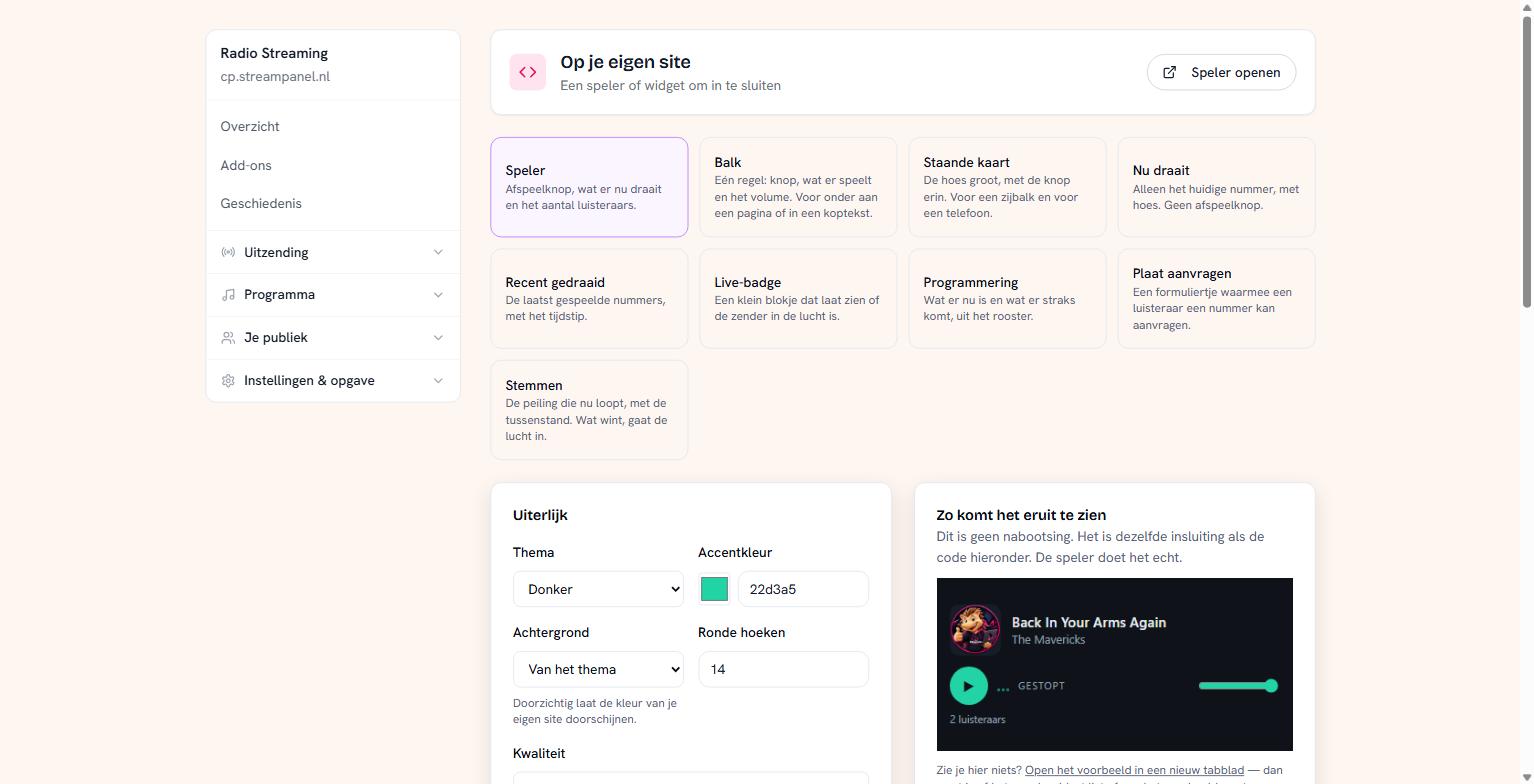 The widget catalogue with a live preview beside it
What's on offer
Speler — play button, what's playing now, and the listener count. The usual choice.
Balk — one line with button, title and volume. For the bottom of a page or in a header.
Staande kaart — the artwork large, with the button in it. For a sidebar or for a phone.
Nu draait — only the current track with artwork, no play button.
Recent gedraaid — the most recently played tracks with times.
Live-badge — a small block showing whether the station is on air.
Programmering — what's on now and what's next, from your schedule.
Plaat aanvragen — a small form with which a listener can request a track.
Stemmen — the poll currently running, with the standings.
The preview is real
What you see on the right isn't a mock-up in our own styling: it's exactly the same embed as the code you're given, including the behaviour. The player really plays.
Seeing nothing here? Then your browser is probably blocking embedded content. Open the preview in a new tab to check.
Appearance
You choose the theme (light or dark), an accent colour, a background and how round the corners are. Set the background to transparent and the widget lets your own site's colour show through — usually the nicest result.
For the player you also choose the quality. If you have a light extra stream for mobile, you can use it here.
Pasting the code
The code sits at the bottom. Paste it into your page where the widget should appear. It's an embed, not a script that changes your site: it fits in virtually any system — WordPress, Wix, a hand-built site.
If you use WordPress, use an HTML block and not an ordinary text block, otherwise the code shows up as text.
Building your own app
If you want to go beyond a widget, there's one public address that puts everything together: your station, all listening qualities, what's playing, and which parts your station has. That's the signpost for anyone building something themselves. You'll find it at the bottom of this page.