hallo@maenda.mediaContactKnowledge Base
Maenda Media
Network
HostingDomainsRadioVPS
DirectAdmin
Proxmox
Cloudflare
LiteSpeed
Imunify360
Let's Encrypt
Softaculous
JetBackup
Shoutcast
Icecast
RIPE NCC Member
Ubiquiti
Appwrite
DirectAdmin
Proxmox
Cloudflare
LiteSpeed
Imunify360
Let's Encrypt
Softaculous
JetBackup
Shoutcast
Icecast
RIPE NCC Member
Ubiquiti
Appwrite
Maenda MediaHosting since 2003

Web hosting, VPS servers and streaming from our own datacenter in Meppel. Dutch support on weekdays.

  • hallo@maenda.media
  • Nederland

Products

  • Web Hosting
  • VPS Servers
  • Managed VPS
  • Radio Streaming
  • Video Streaming
  • Stream monitoring
  • Domains
  • Spam Filtering

Support

  • Contact
  • Knowledge Base
  • Server Status

Company

  • About Us
  • Network Info

Legal

  • Privacy Policy
  • Terms of Service
  • Cookie Policy
  • GDPR
SSL Secure
99.9% uptime target
Dutch company
Payment methods:
iDEAL
Visa
Mastercard
Bancontact
SEPA
© 2026 Maenda Media. All rights reserved.
Made with❤in the Netherlands
Knowledge BaseRadio streamsPlaylists: your station rotation
Back to Knowledge Base
Radio streams

Playlists: your station rotation

Published on September 8, 20262 min read

Table of Contents

  • The four things you set
  • Jingles are a playlist too
  • Each track once
  • How many tracks?

A playlist is a list of tracks with a rule attached: when it plays, how often, and in what order. Together they form the rotation your station draws from when nobody is live.
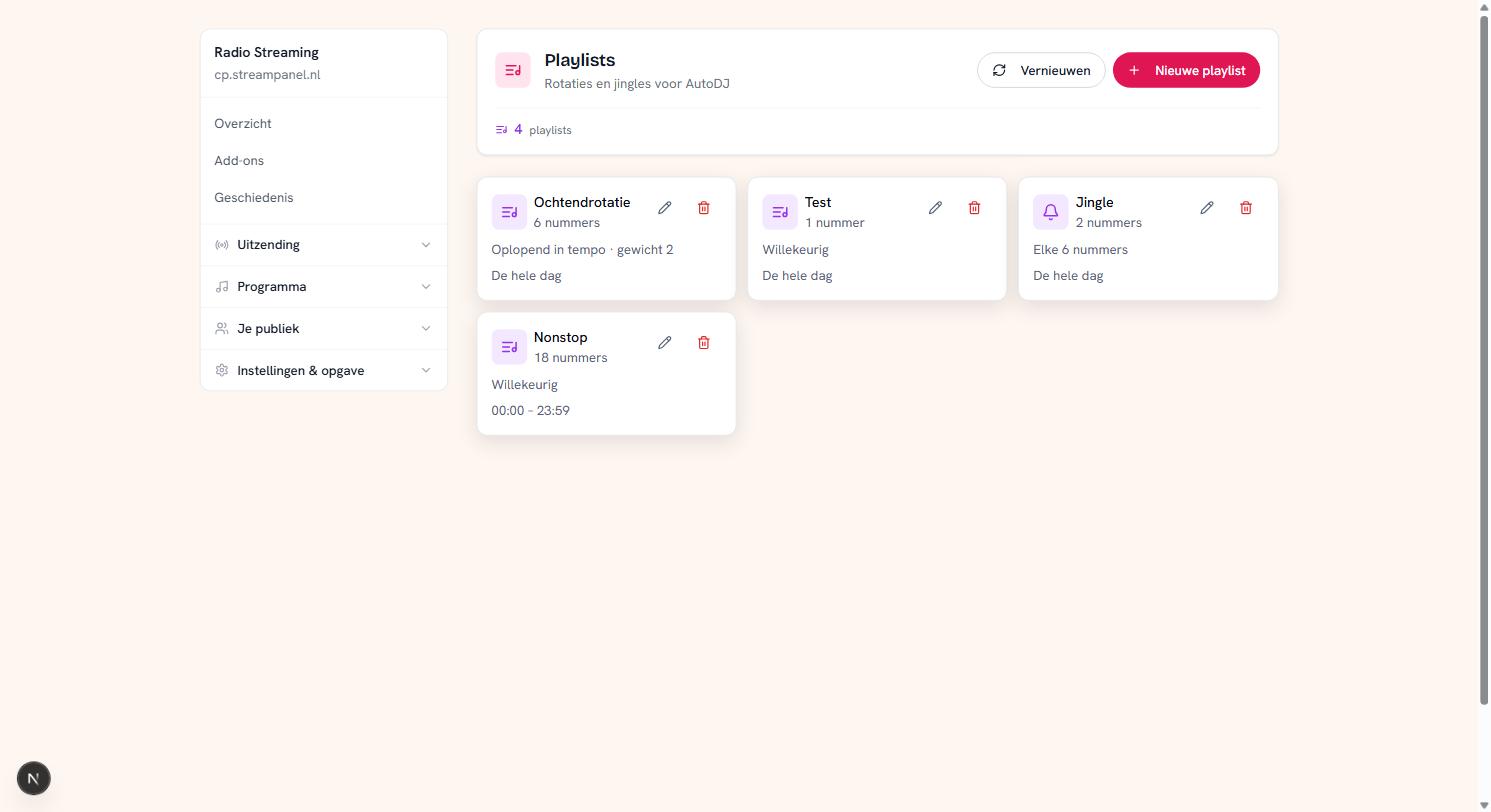
Four playlists with their play mode and time windowFour playlists with their play mode and time window

The four things you set

Name and tracks — what it's about.

Play mode. Random shuffles the list. In order plays it top to bottom. Ascending tempo builds up, which works nicely in a morning block.

Weight. If several playlists are eligible at the same time, the weight decides how often each takes a turn. A list with weight 2 comes round twice as often as one with weight 1. That's how you make your A-list return more often without throwing away your B-list.

Time window. By default a playlist runs all day. Set a window from 06:00 to 10:00 and it only takes part then. That way your morning sounds different from your night without you switching anything.

The window is both fields or neither. Filling in one time produces a list that never gets its turn.

Jingles are a playlist too

You set a jingle playlist to every N tracks. The screenshot shows "Elke 6 nummers": after every six records an ident drops in. That's the normal way to keep your station recognisable.

Watch out, because this is the trap most questions are about: while an hour layout is running, these jingle rules do not apply. The layout then decides where the idents fall. If you notice your idents have "disappeared", first check whether an hour layout is active.

Each track once

Within a playlist every track plays once before the list starts over. That's deliberate: a listener who hears the same thing twice in an hour thinks something is broken.

How many tracks?

Enough that a listener doesn't notice. An hour of listening is about fifteen records; if you want someone to listen all afternoon without repeats you're quickly at a hundred. Below twenty a regular listener hears the whole rotation within a day.

This is part of our radio streaming

Your own station with playlists, presenters and statistics — without your own server.

Radio streams

Related Articles

More articles from this category

Still have questions?

Our support team is happy to help you

Getting started with your radio station

Your station is provisioned and ready. This guide runs from "I've just ordered" to "there's music playing" — and explain...

3 min readRead article

Uploading your music

AutoDJ runs on the music in your library. No music means no broadcast when you're offline, so this is the first real ste...

2 min readRead article

Extra qualities and HLS

Your station broadcasts on one quality by default. With extra streams you offer the same broadcast a second time, encode...

2 min readRead article