Your station is provisioned and ready. This guide runs from "I've just ordered" to "there's music playing" — and explains along the way which two addresses you get and why you must not mix them up.
The overview
Everything starts at Overzicht. That page shows whether your station is on air, how many listeners your plan allows, and the two sets of details you need.
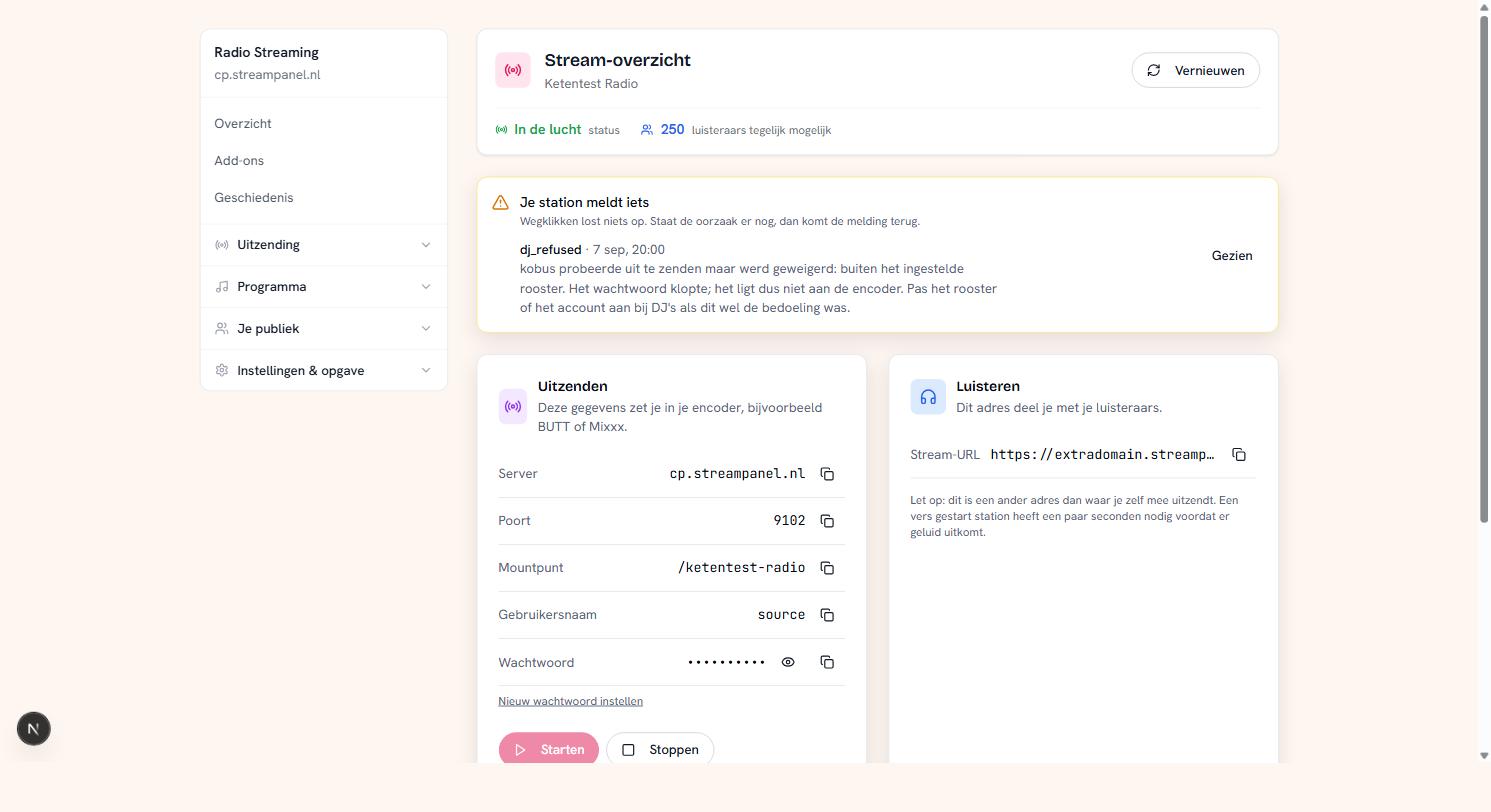 The overview screen of a radio station
At the top you'll see the status. On air means the server is running — not necessarily that sound is coming out. A station that has just started needs a few seconds before the first notes arrive.
Two addresses, and the difference matters
This is the most common question in the first week, so let's get it out of the way.
Broadcasting — the details on the left. Server, port, mount point, username and password. These go into your encoder: BUTT, Mixxx, RadioBOSS, SAM Broadcaster, whatever you use. This address is yours and you share it with nobody.
Listening — the stream URL on the right. This is what you put on your website and give to your listeners.
They look alike and they are not. Put the listening URL in your encoder and you'll get an error that doesn't explain what's wrong. The other way round, you give away your broadcast password.
The username is almost always source. That isn't a setting but the Icecast convention; some encoders fill it in for you.
Your password
The broadcast password sits behind the eye icon. If you want to replace it — because a former presenter still has it, say — use Nieuw wachtwoord instellen. Note that all your encoders will then need updating, including your DJs'.
Starting and stopping
At the bottom you'll find Starten and Stoppen. Stopping really switches your station off; listeners hear silence and their player drops out. That is something different from simply having no music.
You don't normally need to start your station by hand — it keeps running. The buttons are there for when something gets stuck.
Alerts
If something goes wrong, a block appears at the top with what your station is reporting. For example that a DJ was refused because they tried to broadcast outside their schedule.
Dismissing it doesn't fix anything. If the cause is still there, the alert comes back — that's deliberate, so a problem doesn't quietly disappear because someone clicked "seen".
What next?
With the broadcast details you can go live right away. But the nice thing about this platform is that your station keeps running when you're not there. For that you first upload your music — see Uploading your music — and then build playlists.
Outage or maintenance?
The status page shows for each service whether everything is working. An ongoing outage or maintenance is at the top, with the latest update. Resolved incidents from the past 7 days are below the list of services, the most recently resolved first.
If your problem isn't listed, please get in touch with us.