You type a sentence and your station speaks it. A station ID, a transition, or a time check that names the right hour every hour — with the weather in it, if you like.
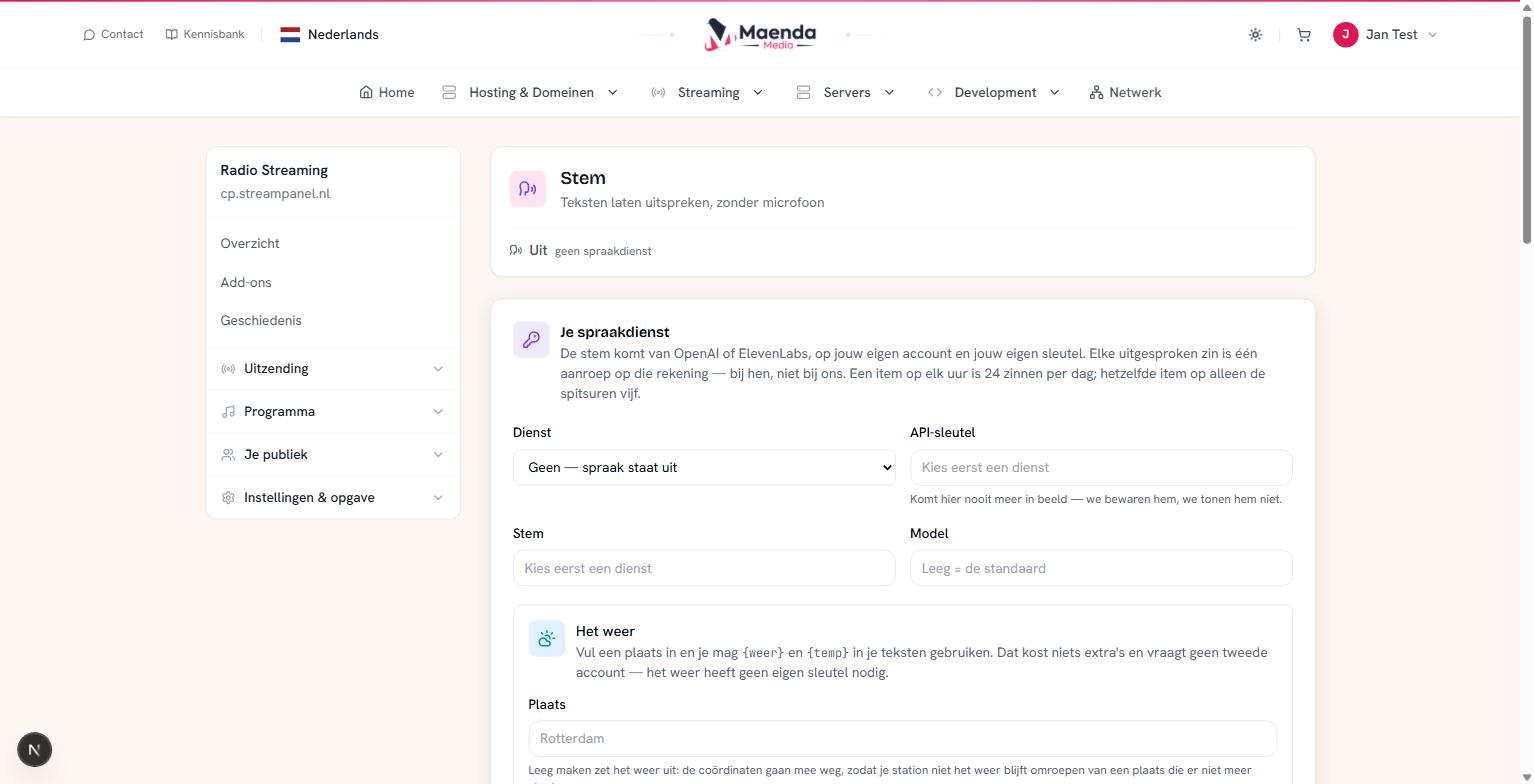 The screen where you set it up
You'll find it under Programma → Stem.
The difference first, because that's where it goes wrong
Two things on this screen look alike. They are not the same, and mixing them up puts a recording of one moment into your rotation that announces the wrong hour for the rest of the week.
Speaking a line happens once. After that it's a file in your library, and it behaves like any other record: you can put it in a playlist, run it as a jingle, or schedule it as a voice track. Perfect for "You're listening to Radio Test". That's still true an hour from now.
A recurring item is a recipe, not a recording. It's spoken again shortly before it airs. That's why it can say "it is now twelve o'clock" without becoming a lie an hour later.
The rule of thumb: if the text changes with the time, it's a recurring item. If it doesn't, it's a line you speak once.
The speech service is yours
This is the only part of your station where every sentence costs money, and that bill sits with you — not with us. You open an account at OpenAI or ElevenLabs, paste your key on this screen, and the calls go out on your account.
At OpenAI you pick a voice by name: alloy, echo, fable, onyx, nova or shimmer. At ElevenLabs you enter the id of a voice from your own library.
Your key never comes back into view here. We store it; we don't show it.
Adding the weather
Fill in a place and you may use {weer} and {temp} in your texts. That costs nothing extra and needs no second account: the weather has no key of its own.
The place is looked up when you save, not when you broadcast. That's deliberate: type "Rotterdma" and you hear about it right there on the screen where you typed it — not tomorrow morning at seven from a time check with no degrees.
If the place comes back spelled differently — you typed "den haag" and it now reads "Den Haag" — that's your confirmation that something real was found.
Clear the place and the weather stops. That's how it should be: your station shouldn't keep broadcasting the weather of a place that is no longer in its settings.
What you may put in a text
The full list sits under the items. The main ones:
| You type | It says |
|---|---|
{tijd} | "twaalf uur", "kwart over drie" |
{station} | your station's name |
{dag}, {datum} | the weekday, and the date |
{weer}, {temp} | "licht bewolkt", and the degrees |
{vorige}, {volgende} | the record that just played, and the one coming up |
An example that does the work:
Het is {tijd} bij {station}. Buiten is het {weer}, {temp} graden.
Note that {tijd} becomes "kwart over drie" and not "15:15". That's not decoration: a speech service handed "15:15" decides for itself what language to read it in, and a Dutch station broadcasting "fifteen fifteen" is worse off than one with no time check at all. If you want the digits anyway, {uur} and {minuut} are there.
With no place set, the whole clause drops away. "Het is {tijd}, {weer}, {temp} graden" becomes "Het is twaalf uur." — not "Het is twaalf uur, , graden".
Misspell a placeholder and it simply stays put. That's on purpose: a typo you can hear is one that gets fixed after a single airing.
Press "Bekijk de tekst". Always.
That button sits next to every template, and it costs nothing — no call at your speech service, not a cent. It shows what will come out, with the real weather in it.
It is the only way to check a template before you pay for it, and the difference between seeing now that you typed {statin} and hearing it tomorrow at seven. Make it a habit.
When it airs
You set a minute (past the hour) and a list of hours. Leave the hours empty and it airs every hour.
That last bit is the whole cost model: an item on every hour is 24 calls a day. The same item on 6,7,8,17,18 — the morning and evening rush — is five.
There is also a switch: precies op deze minuut (exactly on this minute). It is on, and that is usually right — if you fill in a minute, you mean that minute. The item then airs on the second, and the record playing is cut short for it.
Switch it off for something that knows no clock: a station ID, or an announcement of what is coming up. The item then waits for the record to finish and lands on the seam between two — so possibly half a minute later. That is exactly what you want, because such a line need not be right to the second and should not chop a record in half.
If it doesn't air
"It says it was spoken, but I heard nothing." Look at your playout log around that moment: the talk sits behind a record. And if a DJ was at the controls, it was cancelled — just like a scheduled voice track. That's by design.
"It's half a minute late." Then "precies op deze minuut" is off. Switch it on if the line has to be right to the second.
"The weather stopped." Check whether a place is still filled in. Removed is removed, coordinates included.
"It worked yesterday and today it's silent." There's an error on the item, in your speech service's own words. Usually a revoked key or credit that ran out.
"Two items, and only one airs." They share a minute and so land in the same spot. Give them different minutes.
A stale file never airs. If it was spoken more than five minutes ago, it's skipped. If your speech service is down, no time check is better than the wrong one.
Not in your plan?
The screen stays visible and you can see what was there, but nothing is added and nothing is spoken. Your station keeps running as normal.