Asking instead of clicking. You connect an assistant — Claude, for instance — to your station, and then you simply ask: "what was playing last night at eight?", "build a playlist of everything above 120 bpm", "schedule it for every Saturday morning".
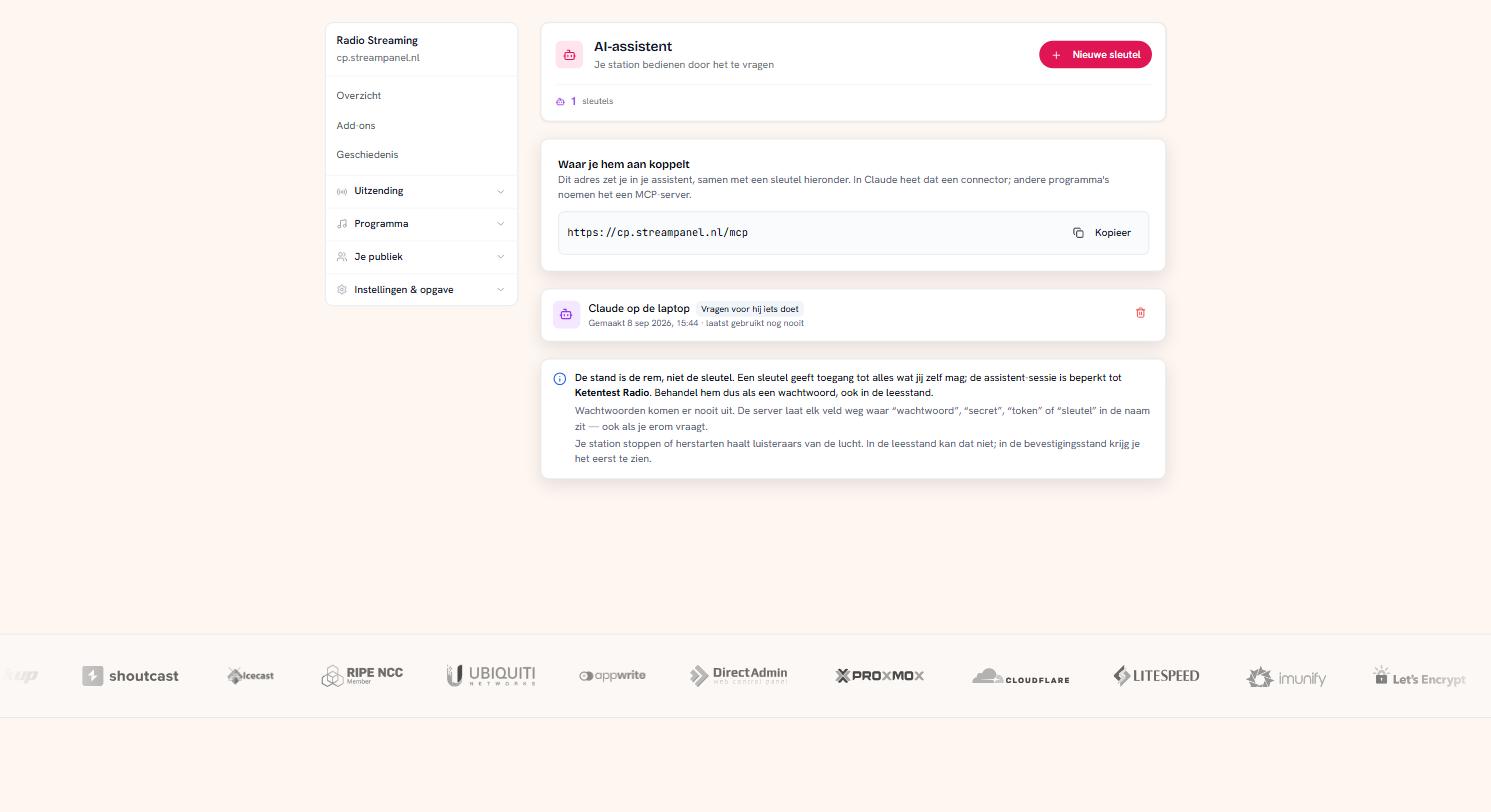 The screen where you set up the connection
You'll find it under Instellingen & opgave → AI-assistent.
What you need
Two things, and both are on that screen:
The address. One line you paste into your assistant. In Claude that's called a connector; other programs call it an MCP server.
A key. You create it here, and you see it once. We only keep a fingerprint of it, so lost is lost — then you revoke it and make a new one.
The mode is the most important thing you choose
Per key you decide how far the assistant may go. This isn't a detail; it's the difference between an assistant that thinks along and one that changes your broadcast.
Read only. It answers questions and changes nothing. And that's stronger than it sounds: in this mode the tools to change anything do not exist. It can't see them, so it can't invent a way around them either. This is the mode to start with.
Ask before acting. Changes are allowed, but it puts every change to you first: this is what would happen, do you agree? Only when you say yes does it happen. The recommended mode for daily use.
Act directly. No intermediate step. Handy when you're driving it yourself and working fast — not for a key you hand to somebody else.
Treat the key like a password
The mode is the brake, not the key itself. The assistant session is limited to this station, but the key gives access to everything you may reach yourself. Anyone who gets hold of it can also use it outside an assistant.
So don't put it in a shared document or a chat message, not even in read mode.
What never comes out
Passwords. Your broadcast password, your DJ passwords, the login for your news source: the server omits every field with "password", "secret", "token" or "key" in its name — even if you ask for it. So don't ask your assistant for them; it cannot reach them.
What to watch out for
Stopping or restarting your station takes listeners off air. In read mode that isn't possible. In ask-first mode you see it coming. In direct mode it happens immediately — which is exactly why that mode isn't the default.
An assistant can be wrong. It fetches the data from your station properly, but the conclusion it draws is still a conclusion. For anything that costs money or listeners: check it on the screen that covers it.
Revoking
Beside every key there's a bin. Revoking takes effect immediately: an assistant using it loses access at that same moment. Your station notices nothing and keeps running.
Do it whenever you lose a laptop, when someone leaves, or when you've shared a key by accident.
Not in your plan?
Then this screen stays visible and you can revoke existing keys, but no new ones are added. Your station, your panel and the ordinary API keep working — only the assistant is refused.